Type: Project. Something quirq builds for people to use.Python☆ 26Updated Oct 13

XO Space
Build, observe and measure agentic work — locally, across every coding agent you use.
One environment for Claude Code, Codex, OpenClaw, Hermes and Antigravity.
Every project, session, todo and cost on one screen. Measure output, not just tokens.
Quick start · Capabilities · Supported agents · How it works · Docs · Contributing





The problem
Every coding agent keeps its own session store, its own auth, its own todo list and its own idea of what a "project" is. Use two of them on the same codebase and you have two histories, two usage bills and no single place to look. And none of them tell you what was actually delivered — only what was spent.
What XO Space is
XO Space is the environment layer between your machine and your agents: a local server (this repository) that sits in front of the agents you already have installed, plus a browser UI that reads what they do. It does not run models or replace the agents. It stitches them together and measures what they deliver.
curl -fsSL https://quirq.ai/install | sh # then open http://localhost:5002/space/Key capabilities
- 👀 Watch your agents work — see which agent is active in which project right now, what it touched, and what it's been doing session by session.
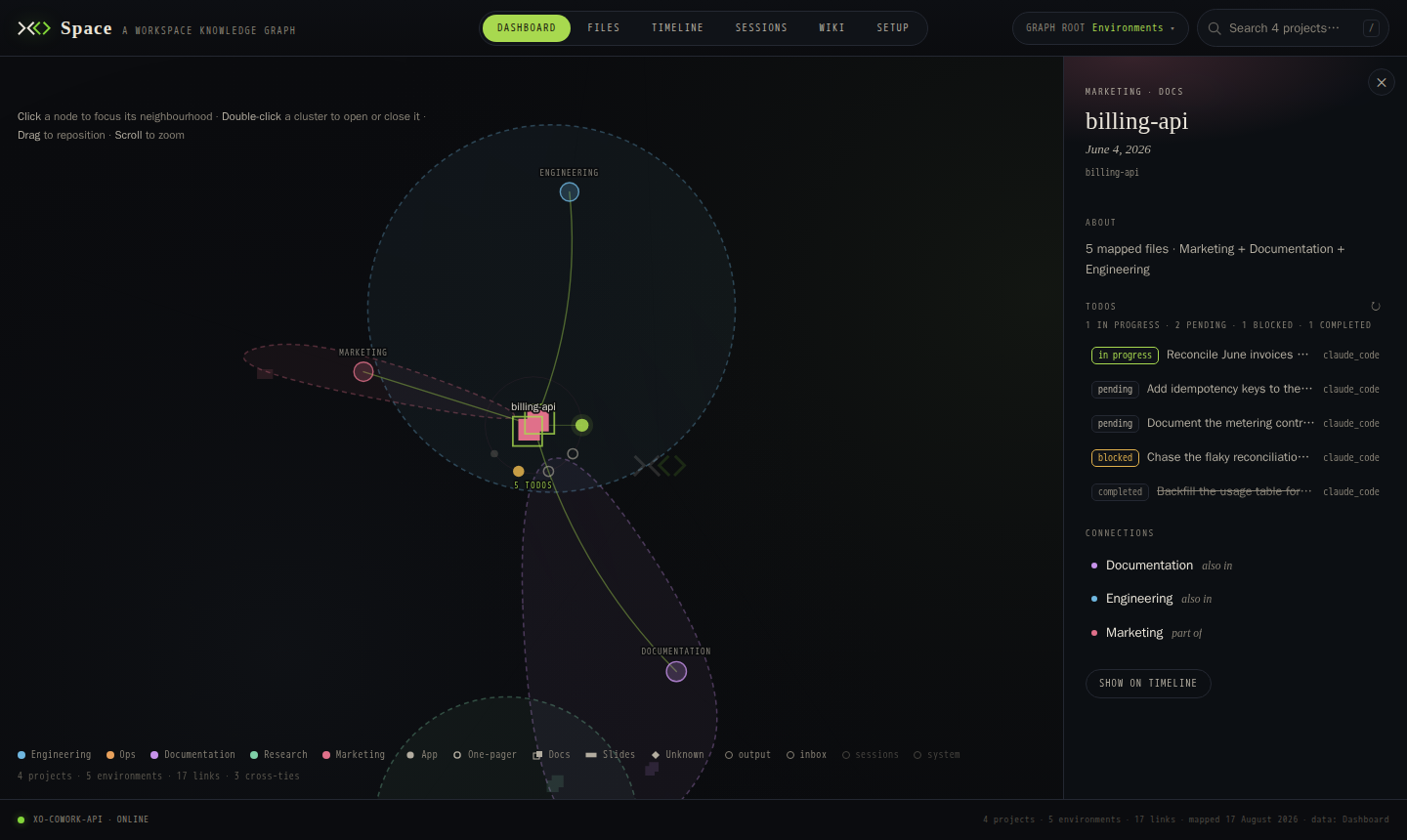
- 🗂️ Your whole workspace in one place — every folder is a project. Files, git history, todos and live agent activity, browsable from one screen instead of five terminals.
- ✅ Manage the work, not the chat — todos per project, kept up to date as agents check them off, so you always know what's done and what's next.
- 🔌 One API for every agent —
POST /api/chat/prompt, read an SSE stream. Same contract whether Claude Code, Codex, OpenClaw, Hermes or Antigravity is behind it; switch with one environment variable. - 📡 Sessions across runtimes — session telemetry from every agent that exposes it, side by side, whichever one you're chatting with.
- 📈 Know what it cost — tokens, cost, per-model and per-tool breakdowns in one shape regardless of runtime.
- 🕰️ See how it grew — every project's git history in parallel lanes; open any commit as a 3D city map where building height is the churn.
- 🛰️ Local-first — binds to
localhost, needs no account, sends nothing until you sign in. What leaves your machine.
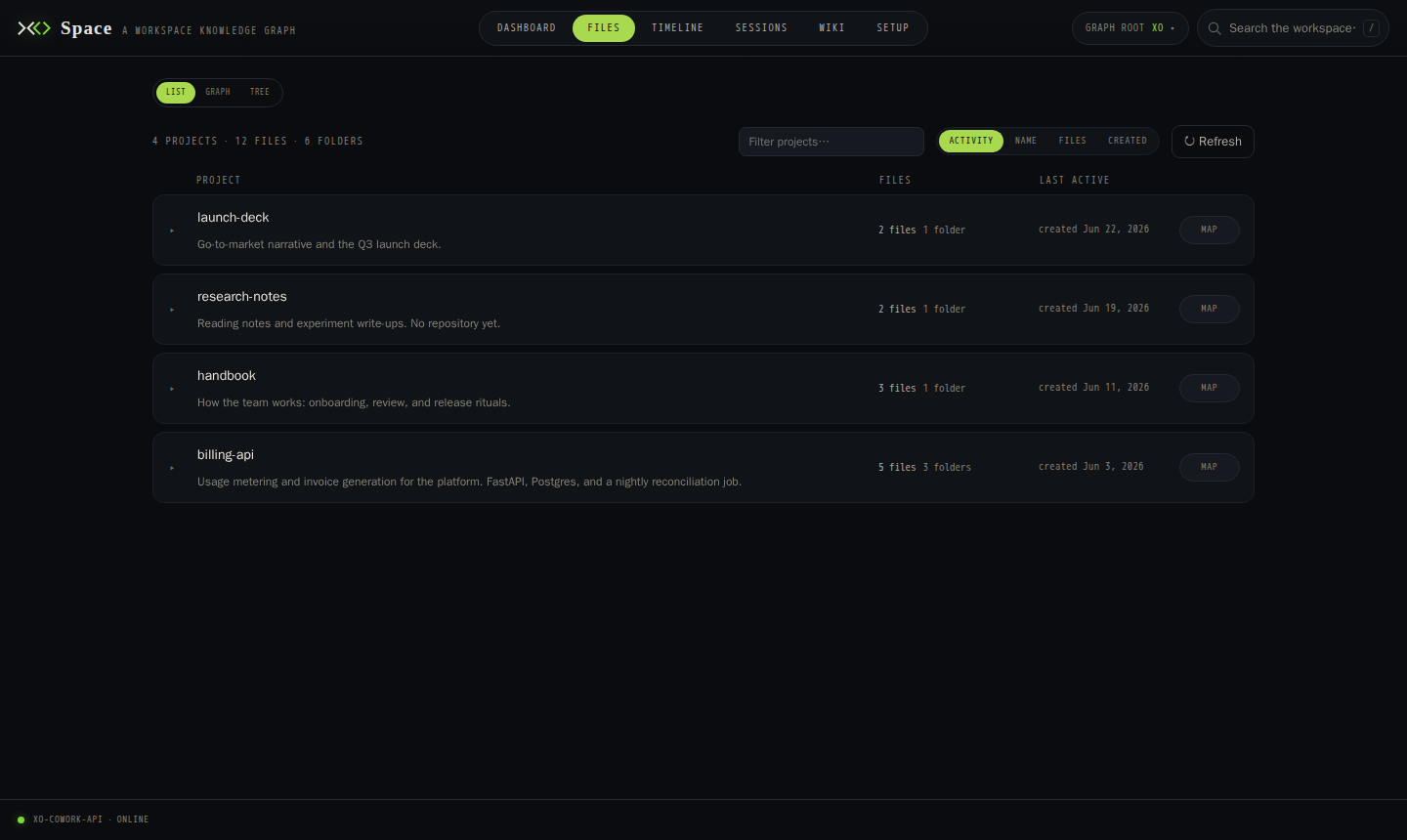 Projects — every project in the workspace, which agent is active in it, last activity. | 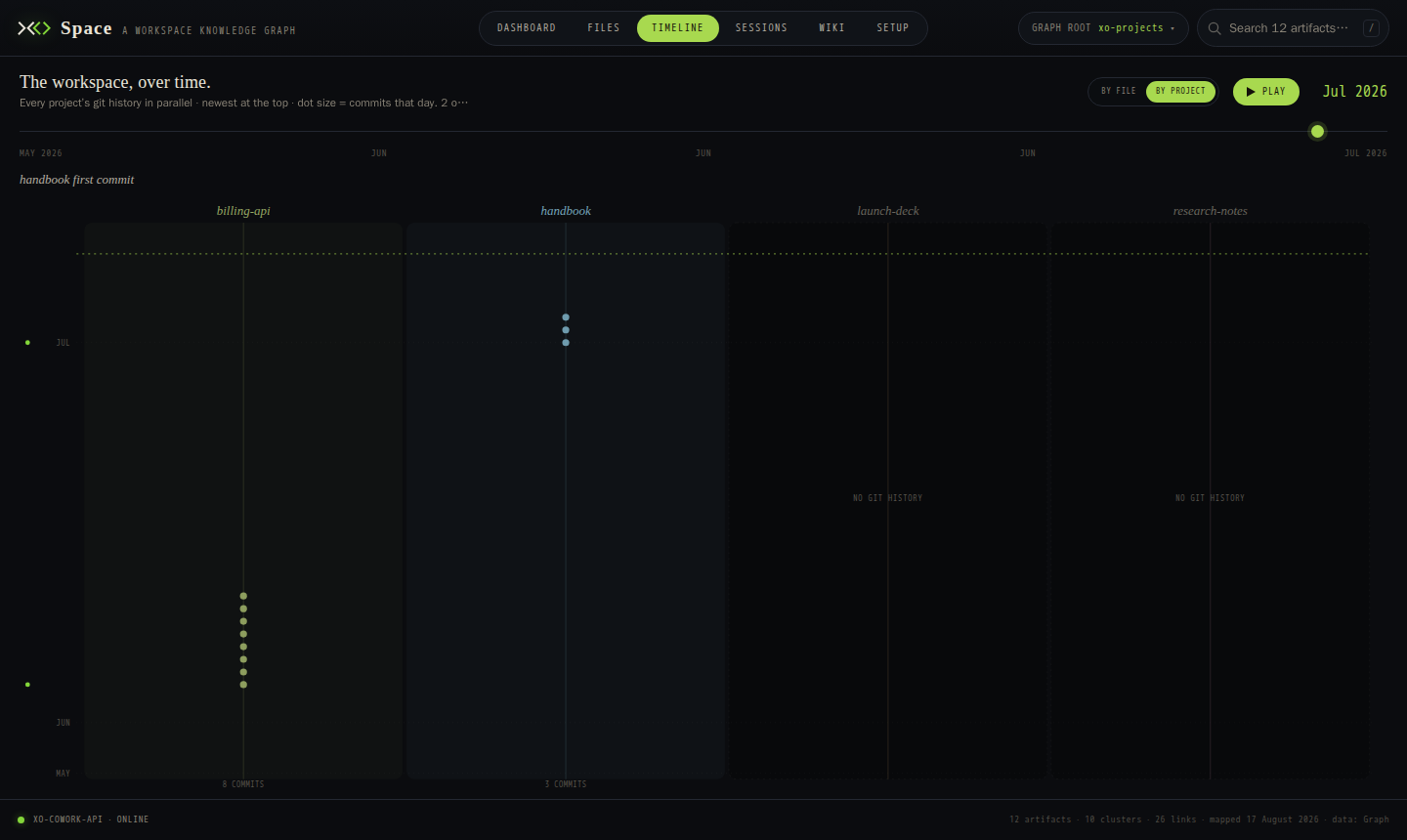 Timeline — every project's git history in parallel lanes; click a commit for the 3D snapshot. |
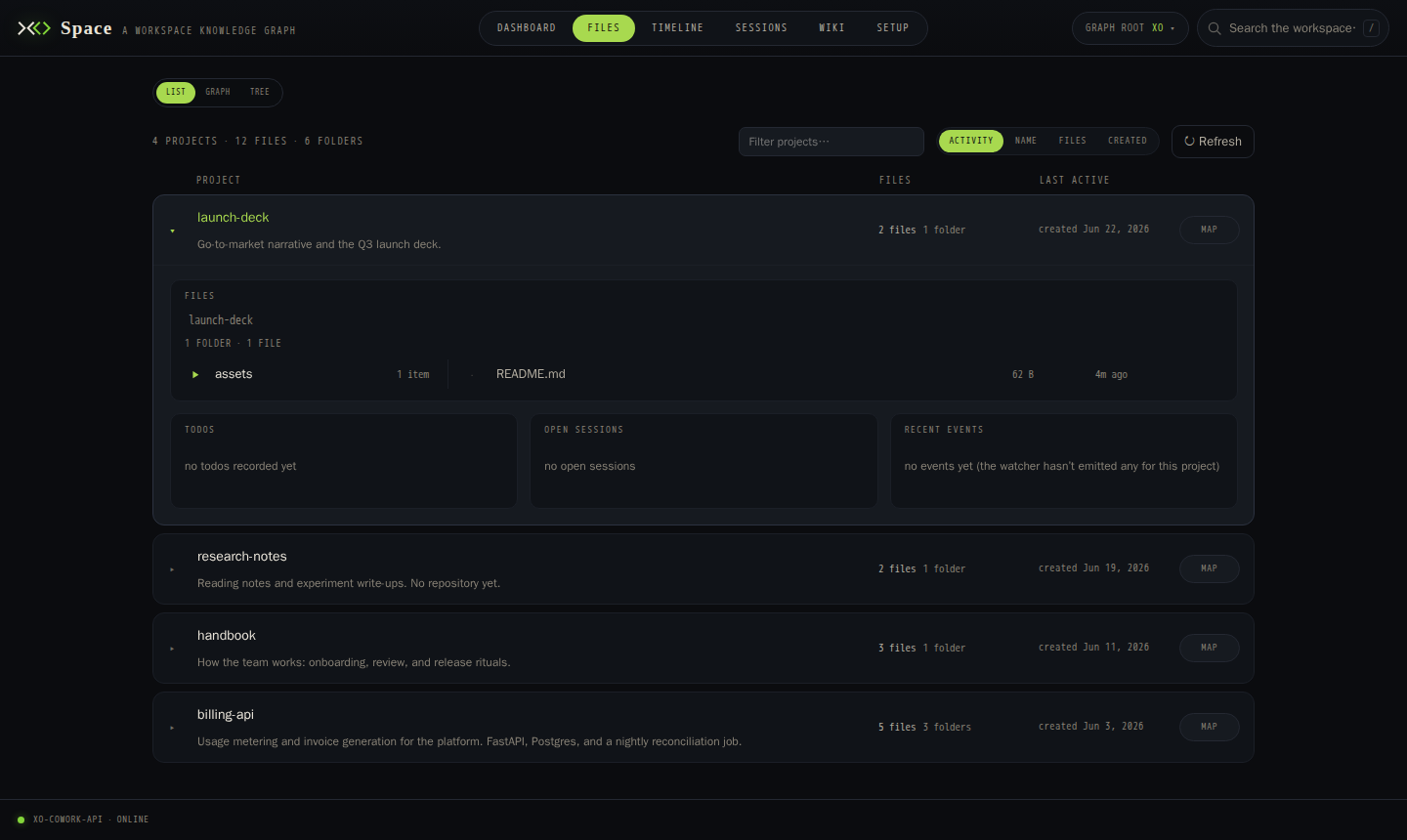 Project drawer — browse a project beside its todos, open sessions and recent events. | 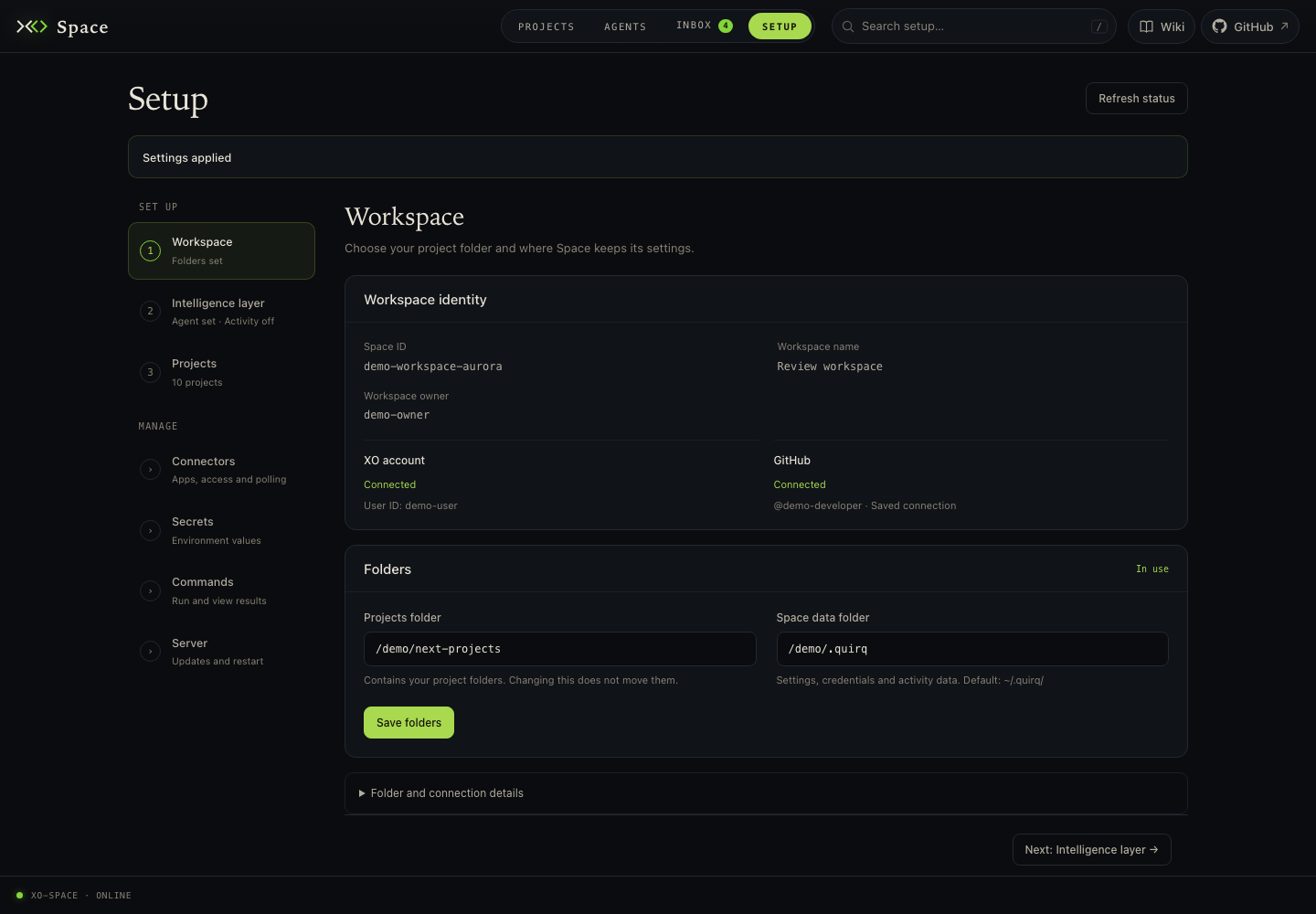 Setup — storage roots, active agent, credentials, self-update. |
Quick start
Install in Codex
Add this repository to Codex once:
codex plugin marketplace add quirq-ai/xo-spaceOpen Plugins → Quirq → XO Space → Install, start a new task, and say
“Open XO Space.” Codex installs and starts Space in ~/xo-workspace (or the
workspace you name), selects the Codex backend, and opens the UI. Existing
installations keep their settings. The server runs while its task/terminal stays
alive. Plugin setup, prerequisites and development-branch installs.
One-click setup
Run this from the directory you want as your workspace — each sub-folder becomes a project:
curl -fsSL https://quirq.ai/install | shThen open http://localhost:5002/space/.
What the installer does: clones this repo into ./xo-space, creates a Python 3.12 venv with uv, and starts the server in the foreground. Ctrl-C stops it; re-running the command updates and restarts it. Machine-local state and logs live in ./.quirq/, next to your projects — including logs/quirq.log for server output and inbox/activity/commands.log for every external command Quirq runs in that state root — and the whole install is one folder you can move or delete. For a clean removal that keeps your project folders, run ./xo-space/uninstall.sh — see INSTALLATION.md.
Requirements: git. Everything else is optional and only disables its own feature — node/npm for installing an agent CLI, gh for project backup, rclone for Drive/OneDrive. Windows runs under WSL (details).
Manual setup
Same result, step by step — if you'd rather see what you're running, or you're going to hack on it:
# 1. Clonegit clone https://github.com/quirq-ai/xo-space && cd xo-space
# 2. First run — detects the checkout, uses it in place, writes ./.env with#    working defaults, and starts the server. Ctrl-C when you've seen it../install.sh
# 3. Configure — edit .env to taste (see the table below), then run again./install.sh.env is written once and never rewritten, so your edits survive updates. Values exported in your shell win over the file (PORT=8080 ./install.sh). The keys it contains:
| Key | What it does | Default |
|---|---|---|
AGENT_NAME | Which agent handles chat: claude_code, codex, openclaw, hermes, antigravity, grokbot | claude_code |
XO_PROJECTS_ROOT | Your workspace — the directory whose sub-folders are projects | the directory you ran the installer from |
QUIRQ_STATE_ROOT | Machine-local state: runtime config, saved credentials, watcher cursors, logs. Must not be inside a project | ./.quirq in that directory |
AI_WORKSPACE_ROOT | The directory the agent subprocess is started in and allowed to touch | same as XO_PROJECTS_ROOT |
HOST, PORT | Where the server listens. Loopback only by default. The API has no login, so HOST=0.0.0.0 lets every device on your network read and change your files: use it only on a network you trust | 127.0.0.1, 5002 |
STAGE | local finds agent CLIs with which; beta assumes the hosted container layout | local |
QUIRQ_WATCHER_SOURCE_MODE | all — the watcher reads every installed agent's session store, so Sessions shows all of them; active — only AGENT_NAME's | all |
QUIRQ_SKIP_BOOT_INSTALL | 1 — install nothing beyond requirements.txt. Set 0 to let boot hooks apt/nvm/npm -g the agent CLI for you | 1 |
UVICORN_RELOAD | Auto-restart on code changes — turn on when hacking on the server | false |
ANTHROPIC_API_KEY, CLAUDE_CODE_OAUTH_TOKEN | Optional. The agent CLI normally uses its own login; set one only if it isn't already authenticated. Leave commented rather than blank | unset |
XO_API_KEY | Links this install to your XO account | unset |
Agent-specific knobs (CLAUDE_CLI_PATH, CODEX_CLI_PATH, the OpenClaw/Hermes gateway URLs and tokens, Google Drive/Vercel connector settings) are documented in .env.example. Roots, the state directory and watcher timing: INSTALLATION.md.
First run. Space opens on Projects → Overview (#/projects/overview). Projects contains Overview | Data | Timeline | Manage, with List | Graph | Tree views inside Data. Choose Data → List (#/projects/data/list) to browse the folders in your workspace, or open Manage → Add project to clone a Git repository. Before the first chat, check Setup → Intelligence layer for the agent connection and activity collection settings. Full walkthrough: INSTALLATION.md.
Finding your projects. Search by name, folder ID or description, filter to Live sessions or Pinned projects, and sort by recent activity, name, indexed files or creation date. Pin projects from Manage; pins stay in this browser and appear in Data’s Pinned filter. Open a Data List row to browse files; folder position and filters survive navigation, and Refresh files rereads the current folder. File counts describe the visible file index, with + when scanning was incomplete; a project missing from the index shows Not indexed. Graph root, available throughout Projects, opens the graph at the chosen node.
Managing projects. Projects → Manage (#/projects/manage) contains cloning, inline sharing and guarded local removal. Each card groups View activity, Share, Pin, Copy GitHub URL and Remove in its header. Expand a card to view its metadata and GitHub Issues and copy recorded values. To share, enter the destination Space ID in the card without leaving Manage. Removing a project deletes only this Space's local copy: sharing is not checked or changed, and the relay does not clone it back until you add it again. The old #/setup/projects address opens Manage.
Inbox and activity. Inbox contains Items | Connections | Jobs | Activity | Sharing activity | Sharing. Activity shows project events; select a project for its todos and current sessions. Sharing activity shows the relay's recent events, while Sharing manages repository access and synchronization.
Setup. Workspace and Intelligence layer guide initial configuration. Workspace shows the Space ID, workspace owner, XO account and verified GitHub identity. Connectors, Secrets, Commands and Server provide app connections, environment keys, saved commands/results and server controls. Direct URLs are #/setup/workspace, #/setup/intelligence, #/setup/connectors, #/setup/secrets, #/setup/commands and #/setup/server. Opening Setup starts at Workspace; existing #/setup, #/connectors and #/secrets links remain compatible.
Search Setup to find a setting and jump to its control. Connectors includes GitHub, MagicPath, Vercel, Google Drive and OneDrive alongside account apps, with connection status and the existing sign-in and management actions.
XO Managed Cloud
Don't want to run a server? app.xo.builders gives you the same XO Space, already running, in an XO-provisioned workspace — one click, nothing to install, your agents and projects ready when you open the tab.
| Self-hosted | XO Managed Cloud | |
|---|---|---|
| Runs on | your machine | XO-provisioned workspace |
| Setup | one command, you keep it running | none — always on |
| Account & sign-in | optional | built in |
| Updates | re-run the installer | automatic |
| Sharing projects with a team | via GitHub backup | built in |
| Code | this repo | this repo |
Supported agents
Pick the active agent with AGENT_NAME (or from the Setup tab). Agents that expose session telemetry show up in the Agents tab even when they are not the active one.
| Agent | AGENT_NAME | Chat | Sessions | Notes |
|---|---|---|---|---|
| Claude Code | claude_code | ✅ | ✅ | claude CLI subprocess |
| Codex | codex | ✅ | ✅ | codex exec subprocess |
| OpenClaw | openclaw | ✅ | ✅ | HTTP gateway on :18789; the default when nothing is configured |
| Hermes | hermes | ✅ | ✅ | HTTP gateway on :8642, one per profile |
| Antigravity | antigravity | ✅ | ✅ | agy CLI subprocess + Google OAuth |
| Grok Bot | grokbot | partial | partial | External host gateway on :1340; replies arrive after polling. Text history comes from the gateway for Space-indexed chats. No Space project/MCP/model selection, usage, status integrations, Agents management, telemetry or prompt suggestions. See Grok Bot limits. |
| Cursor | — | — | ✅ | Read-only: sessions appear in telemetry, cannot run a turn |
| Your own | <name> | ✅ | ✅ | Drop config/agents/<name>/ + services/cowork_agent/adapters/<name>/ — auto-discovered, no core edits. Guide: DEVELOPING.md §4 |
Grok Bot limits
Set AGENT_NAME=grokbot and run the host separately. The gateway defaults to
http://127.0.0.1:1340 (GROKBOT_GATEWAY_URL, alias SAND_GATEWAY_URL);
chat needs SAND_GATEWAY_TOKEN or the token in sand-data/gateway.json.
The community SDK documents the
gateway protocol; it is not a host installer. Space supplies no host
installer, setup.sh or troubleshoot.py, and invokes no Grok Bot binary.
Where to run this
Supported: install Space on the Grok Bot cloud computer. The default
127.0.0.1:1340 address refers to that computer, not your laptop.
Advanced: run Space elsewhere with a private SSH or Tailscale tunnel to
port 1340 and set GROKBOT_GATEWAY_URL to the tunnel endpoint. The gateway has
no public or tailnet route by default. Never expose port 1340 publicly:
the token gives full control of the host.
Space saves each chat's UUID, host seat, title and times in its session index
before sending the prompt. Follow-ups reuse that seat. The Sessions tab lists
Space-indexed chats without per-row gateway calls; host-created seats are not
imported. Reopening a chat reads text-only history through
getAgentTranscript, paging older entries with getAgentTranscriptPage and
beforeSeq when the returned window starts later. No sand-data mount is
needed if the URL and token are configured. Tool calls/results are absent
from the observed host transcript. The amount of older history retained by
the host remains unverified; pagination can only return what the host retains.
Gateway history errors (including an unreachable host or missing token) are
logged without the token and return empty history. Setup stores secrets in
Space's ~/.quirq/secrets/secrets.env (or QUIRQ_SECRETS_FILE), outside host data.
Setup checks the active gateway's unauthenticated health endpoint, with a
five-second deadline. No local CLI or host data folder is required for that
check; a reachable service does not verify credentials or activity collection.
New chats get separate retained host seats by default; the reviewer verified
that separate seats run in parallel. These xo-space-*
seats stay for follow-ups and must be deleted on the host when no longer
needed; deleting a Space session does not delete its host seat. Standalone
one-shot calls without a Space session delete their newly created seat after
completion or failure. GROKBOT_DEFAULT_AGENT_ID explicitly opts into one
shared host conversation: separate Space chats then share context and
history. Leave it unset for isolation; avoid concurrent prompts on a shared
seat, including prompts sent outside Space.
Replies arrive as a single text block after polling (up to 600 seconds), with
an initial waiting status and SSE heartbeats, but no live tokens, tool or
thinking events. Completion requires both an idle seat (including tasks and
subagents) and replies matched by clientNonce → requestId. Acceptance
not-found does not block completion. Multiple reply messages are joined.
The prompt matching this turn's nonce must have a valid requestId; unrelated
entries without correlation keys are ignored. Cancellation and timeout
attempt interruptAgentRun; if the host is unavailable or does not support
it, stop the turn on the host.
Project selection/agent_id, Space connections and per-user MCP configuration,
and per-prompt model selection are not forwarded; the host controls its
workspace, tools and model. Usage accounting, model/provider/channel status,
Agents management, session telemetry/presence/visualizer integration and
prompt suggestions are out of scope (their capabilities return empty/501).
The Chat tab is hidden in the current build, and the visible Agents, Inbox and
Projects activity views do not show Grok Bot chats yet. A follow-up needs
gateway-backed session telemetry, activity and presence; importing chats
created outside Space also needs a policy. Session updatedAt currently
advances only when Space sends a prompt.
Regression tests use the reviewer's observed live-host message shapes with a
mocked HTTP transport. The reviewer validated new chats, follow-ups, isolated
seats and reopening four-message history through Space's HTTP/SSE endpoints
on a live Grok Bot computer at d57c2dc. Long-chat retention and pagination
remain unverified on a live host.
How it works
Space UI (/space/) · XO desktop app · any HTTP/SSE client │ ▼ ┌───────────────────────────────┐ │ xo-space server (this repo) │ │ /api/chat /api/sessions │ │ /api/files /api/usage … │ │ │ │ adapters/<agent>/ ← one per │ │ agent, loaded by AGENT_NAME │ └───────────────┬───────────────┘ ▼ ~/.claude/ ~/.codex/ ~/.openclaw/ ~/.hermes/ … (each agent's own on-disk state)A chat turn is two calls:
# 1. Send the prompt — returns immediatelycurl -sX POST http://localhost:5002/api/chat/prompt \  -H 'Content-Type: application/json' \  -d '{"text":"Refactor the auth flow"}'# → {"stream_id":"8f3a...", "session_id":"9d4e..."}
# 2. Read the response as server-sent eventscurl -N http://localhost:5002/api/chat/stream/8f3a...# event: text-delta data: {"text":"Sure, "}# event: done data: {"finish_reason":"stop", ...}The router never knows which agent it is talking to. Each agent lives in services/cowork_agent/adapters/<name>/ behind one interface (BaseAgentAdapter), and a background watcher tails each agent's on-disk session files to build the workspace views. Architecture in depth: DEVELOPING.md. Full API reference: /docs on a running server.
Projects. Every direct sub-folder of your workspace root is a project. The watcher writes a .xo/ folder inside each one with project.json, todos.json, stats.json, a timeline and session metadata — ids, counts, timings, cost. Chat content stays in the agent's own store and is never copied there, so a project folder is always safe to push or share.
What leaves your machine
Nothing, by default. A self-hosted install binds to loopback, needs no account, and sends no usage data. Session traces and telemetry stay in .quirq/ and the agents' own stores.
If you set XO_API_KEY (or sign in from the app) to link the install to your XO account, a daily usage summary is sent: token counts, estimated cost, and message/session/tool-call counts per model. Normal metric fields exclude prompts, responses and file contents; diagnostic error notes can include source filenames and raw error details. Leave the key unset to stay signed out.
To see what your install decided: open Setup → Intelligence layer → Usage reporting (/space/#/setup/intelligence), the server's own decisions are in <state root>/logs/quirq.log (grep usage_sync ~/.quirq/logs/quirq.log on the default install), and every external command Quirq runs is recorded in <state root>/inbox/activity/commands.log. The installer prints the log pointers on every run.
If XO_API_KEY is set and XO_SPACE_ID names this workspace, project sharing is active: once a minute XO Space asks xo-swarm-api which repos are shared with this workspace, and after you push a shared repo it reports the new commit hashes and your workspace id. Hashes only, never diffs, messages or file contents. Without both values set, the relay makes no network calls at all. In the other direction, a repo someone shares with your workspace is cloned into your XO root automatically (one at a time, never over an existing folder, nothing from it is run); set PROJECT_SHARING_AUTO_CLONE=false to keep the clone step manual.
Saved jobs in Setup (scheduled or manual) run locally with the server’s environment. Their definitions and results stay under <quirq state>/scheduler/, and their per-command output logs under <quirq state>/logs/scheduler/. The executor also writes its redacted shared <quirq state>/inbox/activity/commands.log unless disabled; at 5 MB it moves to <quirq state>/inbox/activity/archive/commands.<stamp>.log (the first start after an update moves an earlier release's logs/commands.log there too) and nothing deletes it, so that history grows until you remove it. Set QUIRQ_COMMAND_LOG_ARCHIVE=false to keep only the previous log instead, as <quirq state>/inbox/activity/commands.log.1, so the log never takes more than about 10 MB. The Jobs card adds no reporting. A command you choose can make its own network requests.
Everything else on the network happens because you asked for it: git fetch when Setup checks for updates, GitHub when you back a project up, connectors you connect, and whatever the agent runtimes themselves do.
Documentation
| Where | What |
|---|---|
| Space documentation | Full guides: installation, UI walkthrough, Observability |
| INSTALLATION.md | Prerequisites, first run, local data layout, configuration, Windows |
| DEVELOPING.md | Architecture, adding an agent, validation |
| CONTRIBUTING.md | Dev setup, ground rules, PR process |
In-app Wiki — /space/#/wiki | Open Wiki at the top right for a compact offline overview; detailed online guides open in a new tab |
/docs on a running server | API reference (changes with the active agent) |
| space_ui/README.md | The browser UI |
| plugins/quirq/README.md | Codex plugin: click install and open Space |
| plugin/README.md | Claude Code plugin |
| AGENTS.md | Rules for AI agents editing this repo |
FAQ
Does it replace my coding agent?
No. It drives the agents you already have installed and reads what they leave on disk. You still need the agent's own CLI and account.
Does it see my conversations?
It reads them from the agent's store to show you sessions, but never copies them into a project folder and never uploads them. See What leaves your machine.
Does it run on Windows?
Under WSL. The watcher uses fcntl and the scripts are bash. See the Windows notes.
What is quirq?
The output meter — a unit of verified, owner-valued, delivered work, measured by comparing world state before and after instead of trusting self-reports. The .quirq/ directory is its local state. Read more.
Do I need an account?
Not to self-host — everything local works signed out. An account is what connects you to XO Managed Cloud, or links a self-hosted install to it.
Support
Need help? Open an issue — bugs, questions and ideas all go there; say if you're not sure it's a bug. The in-app Wiki (/space/#/wiki) is a compact offline overview; Space documentation contains the full guides. For security issues, don't post details — open an issue titled "Security: request for a private channel" and a maintainer will reply.
Contributing
We'd love your help. Found a bug 🐛, want a runtime that isn't here 🧩, or have an idea ✨?
- Start with
good first issueorhelp wanted. - Small fix? Just open the PR. Bigger change? Open an issue first so nobody duplicates the work.
- Adding an agent is designed to be two folders and zero core edits — the best-paved path in the repo.
- Branch from and target
main; that is what the installer ships.developmentis the maintainers' staging branch, not a PR target.
CONTRIBUTING.md has the dev setup, the ground rules and the PR checklist. No CLA — contributions are MIT like the rest of the code.
License
Released under the MIT License.
Part of XO · Maintained at quirq-ai/xo-space · Docs